






Class 3 Digital Signature Certificate (DSC) in India: Types, How to Apply, Uses and Cost
Table of Contents
What is a Class 3 Digital Signature Certificate (DSC)?
Definition: A Digital Signature Certificate (DSC) is a secure digital key issued by a licensed Certifying Authority (CA) that electronically authenticates your identity. It is the digital equivalent of a handwritten signature or a stamped seal, but far more secure.
A DSC uses Public Key Infrastructure (PKI) technology to create a unique encrypted signature linked to your identity. When you digitally sign a document, the signature verifies both who you are and that the document has not been altered since you signed it.
Under the Information Technology Act, 2000 (IT Act), a digital signature is legally valid and admissible as evidence in Indian courts. The Controller of Certifying Authorities (CCA), operating under the Ministry of Electronics and Information Technology (MeitY), regulates all DSC issuance in India.
What Information Does a Class 3 Digital Signature DSC Contain?
Every DSC issued in India contains the following details:
- Your full name
- Email address and contact details
- Pin code and address
- Name of the issuing Certifying Authority (CA)
- Serial number and validity period of the certificate
- Your public key (used for encryption and verification)
Legal Basis: Where Does Digital Signature Get Its Authority?
The legal framework for Digital Signature Certificates in India rests on three pillars:
- Information Technology Act, 2000 – Section 3 grants legal recognition to digital signatures.
- IT (Certifying Authorities) Rules, 2000 – Defines how CAs must operate and issue certificates.
- CCA-IVG Guidelines 2024 – The latest guidelines mandating live video verification (LVV) for all new DSC issuance, replacing the old physical verification model.
Important Update (2024): The Controller of Certifying Authorities introduced mandatory live video verification (LVV) for all DSC applications. Physical document submission alone is no longer sufficient. All applicants must now complete a real-time video KYC process.
Class 3 Digital Signature: The Only Active Standard
As of January 2021, Class 3 DSC is the only class issued for business and government use. It requires strong identity verification and is mandatory for:
- MCA/ROC filings
- GST portal transactions (for companies)
- Income Tax e-filing (for audited returns)
- e-Tendering and e-Procurement portals
- DGFT, ICEGATE, EPFO, GEM portal, Trademark and Patent filings
Sign Certificate vs. Encryption Certificate vs. Sign and Encrypt
Within Class 3, you can choose the certificate type based on your use case:
| Certificate Type | What It Does | Best For |
|---|---|---|
| Sign Certificate | Authenticates your identity on documents | MCA, GST, ITR, e-Tendering |
| Encryption Certificate | Encrypts data so only the intended recipient can read it | Secure document sharing, banking |
| Sign and Encrypt Certificate | Does both – signs and encrypts | Legal, Finance, and Defence sectors |
For most Indian businesses and professionals, a Sign Certificate under Class 3 is sufficient for all government compliance filings.
Who Needs a Digital Signature Certificate in India?
A DSC is legally required or practically necessary for a wide range of individuals and entities:
| Category | Mandatory For |
|---|---|
| Company Directors and LLPs | MCA / ROC filings, e-Forms, Annual Returns |
| Chartered Accountants (CAs) | Income Tax audit reports, GST filings |
| Company Secretaries (CS) | MCA filings, resolutions |
| GST Registrants (Companies) | GST registration, return filing |
| e-Tender Participants | GEM, CPPP, and state portal bidding |
| Exporters / Importers | DGFT, ICEGATE transactions |
| Trademark / Patent Applicants | IP India online filings |
| EPFO Employers | PF return submissions |
Individual taxpayers filing non-audited ITRs do not mandatorily require a DSC, but many professionals prefer to use one for security.
Documents Required to Apply for a DSC
The documents vary based on your category. With Aadhaar eKYC, physical document submission can be avoided entirely.
For Indian Individuals
- PAN Card (mandatory)
- Aadhaar Card (for eKYC, or as identity proof)
- Passport-size photograph
- Address proof (Aadhaar, Voter ID, Passport, Driving Licence)
- Valid mobile number and email ID linked to Aadhaar
For Companies / LLP / Organisations
- PAN of the organisation
- Certificate of Incorporation / LLP Agreement
- Board Resolution authorising the signatory
- Individual documents of the authorised signatory (PAN + Aadhaar)
- Organisation’s address proof
For Foreign Nationals
- Valid Passport (mandatory, notarised and apostilled)
- Visa copy
- Address proof in home country
- Indian address proof if applicable
Note: Aadhaar eKYC is the fastest and most paperless route for Indian citizens. If your Aadhaar mobile number is active, you can complete the entire DSC process without submitting any physical documents.
How to Apply for a DSC Online: Step-by-Step Process
Applying for a DSC in India is now fully online. Here is the complete process:
- Choose a licensed Certifying Authority (CA) from the CCA-approved list.
- Select the DSC class (Class 3), certificate type (Sign / Encrypt / Both), and validity period (1, 2, or 3 years).
- Fill in the application form with your personal details, organisation information, and contact details.
- Upload supporting identity and address proof documents if not opting for Aadhaar eKYC.
- Complete mobile OTP verification on your registered mobile number.
- Complete email OTP verification on your registered email ID.
- Undergo live video verification (LVV) as mandated by CCA-IVG Guidelines 2024. You will need a working webcam and your original PAN card ready.
- Receive your DSC on a FIPS 140-2 compliant USB Crypto Token delivered to your address.
Processing time is typically 1 to 3 business days after successful video verification. Aadhaar eKYC-based applications can be completed in as little as a few hours.
DSC Validity and Renewal
A DSC in India comes with a fixed validity period chosen at the time of application:
| Validity Option | Ideal For | Renewal Needed |
|---|---|---|
| 1 Year | Short-term or one-off use | Yes, after 12 months |
| 2 Years | Regular business filers | Yes, after 24 months |
| 3 Years | Frequent users, MCA-registered companies | Yes, after 36 months |
Start the renewal process 15 to 30 days before your DSC expires. If your DSC expires during an active transaction, the filing will be rejected.
Renewal requires fresh KYC verification including the new live video verification mandate. The USB token can typically be reused for the renewed DSC.
Cost of a Digital Signature Certificate in India
The cost of a DSC depends on the Certifying Authority, validity period, and certificate type.
| Component | Approximate Cost |
|---|---|
| Class 3 Sign DSC (1 Year) | Rs. 700 – Rs. 1,200 |
| Class 3 Sign DSC (2 Years) | Rs. 1,200 – Rs. 2,000 |
| Class 3 Sign DSC (3 Years) | Rs. 1,800 – Rs. 3,000+ |
| Class 3 Sign and Encrypt DSC (2 Years) | Rs. 2,500 – Rs. 4,000+ |
| USB Crypto Token (one-time) | Rs. 500 – Rs. 800 (if not already owned) |
| Renewal (2 Years) | Rs. 1,000 – Rs. 1,800 |
Prices are indicative and vary across providers.
Key Benefits of Using a Class 3 Digital Signature Certificate DSC
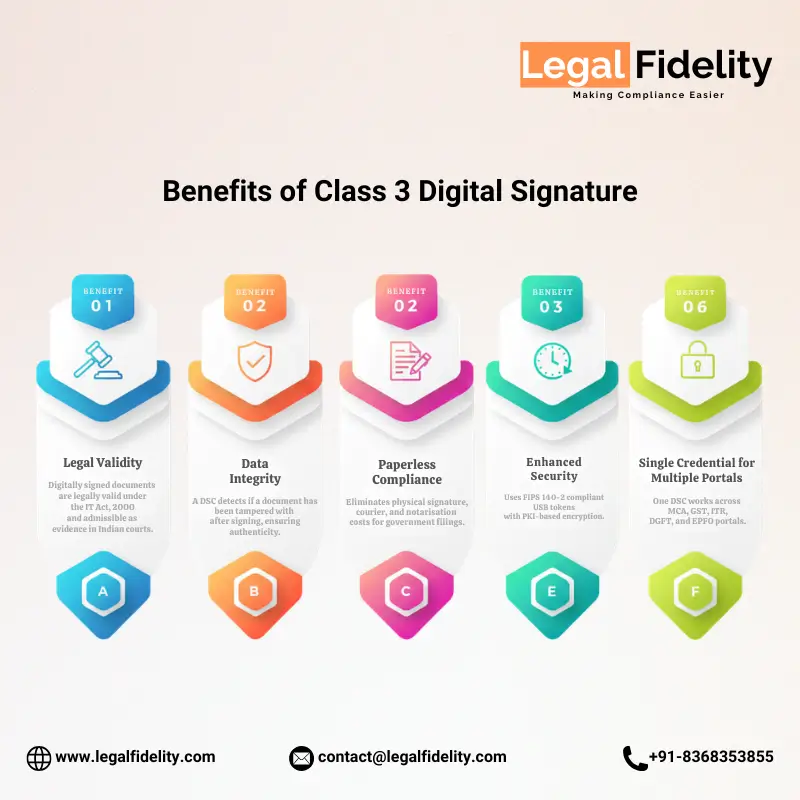
- Legal Validity: Digitally signed documents are legally valid under the IT Act, 2000 and admissible as evidence in Indian courts.
- Data Integrity: A DSC detects if a document has been tampered with after signing, ensuring authenticity.
- Paperless Compliance: Eliminates physical signature, courier, and notarisation costs for government filings.
- Time Savings: Submit documents online 24×7 without visiting government offices.
- Enhanced Security: Uses FIPS 140-2 compliant USB tokens with PKI-based encryption.
- Single Credential for Multiple Portals: One DSC works across MCA, GST, ITR, DGFT, and EPFO portals.
How to Register Your Class 3 DSC on Government Portals
Register DSC on Income Tax e-Filing Portal
- Log in to incometax.gov.in with your PAN and password.
- Go to Profile Settings and click on Register Digital Signature Certificate.
- Download and install the emSigner utility from the portal.
- Insert your DSC USB token, select your certificate, and click Register.
Register DSC on MCA Portal
- Log in to mca.gov.in with your Director Identification Number (DIN) and password.
- Go to My Profile and select Update DSC.
- Insert your USB token, select the correct certificate, and confirm.
Register DSC on GST Portal
- Log in to gst.gov.in with your GSTIN credentials.
- Navigate to My Profile, then Register/Update DSC.
- Select the authorised signatory PAN, click Register, insert USB token, and apply.
Compatibility Note: Most government portals require the emSigner utility or a DSC Management Tool to be installed. Ensure your browser and Java settings are compatible. Chrome and Edge are generally the most reliable browsers for DSC-based portal transactions.
Common DSC Errors and How to Fix Them
| Error | Likely Cause | Fix |
|---|---|---|
| DSC Token Not Detected | Driver not installed or USB issue | Install the token driver from the CA website; try a different USB port |
| Certificate Expired Message | DSC validity lapsed | Renew your DSC through your original CA at the earliest |
| Signature Invalid on Portal | Wrong certificate selected or mismatch with PAN | Ensure you select the certificate linked to your exact PAN |
| emSigner Not Running | Utility not installed or blocked by firewall | Reinstall emSigner; allow it through Windows Firewall or Antivirus |
| Token Not Recognised After Renewal | New certificate not updated on token | Contact your CA; they will update the token with the new certificate via their tool |
| Java Error on Portal | Outdated Java or browser setting | Update Java; enable the portal site as a trusted site in Java control panel |
DSC for Foreign Nationals and NRI Company Directors
Foreign nationals and Non-Resident Indians (NRIs) serving as directors of Indian companies also need a DSC for MCA compliance. The process differs slightly:
- Passport is the primary identity document (must be notarised and apostilled in the country of residence).
- Proof of Indian address is required if the person is resident in India at the time of application.
- Some CAs offer doorstep video verification services for overseas applicants.
- Application is still submitted online through a licensed CA.
Foreign nationals without an Aadhaar card cannot use the eKYC route and must go through the document verification process.
How to Check Your DSC Validity
Method 1: Using Your CA’s Token Management Tool
- Insert your USB token.
- Open the token management software provided by your CA (e.g., eMudhra Token Manager).
- View the certificate details including the validity period shown under the certificate properties.
Method 2: On the Government Portal
- Attempt to sign into the relevant government portal (MCA, GST, ITR).
- The portal will display your DSC certificate details including the expiry date during the signing step.
DSC Quick Reference Checklist
Use this checklist before applying for your DSC:
- Identify the correct DSC type: Class 3 Sign is most common for businesses.
- Confirm your Aadhaar is linked to an active mobile number for eKYC.
- PAN card must be original and available for the live video verification session.
- Choose a CCA-licensed Certifying Authority.
- Ensure you have a working webcam and stable internet for the video KYC step.
- Note the DSC validity period and set a reminder to renew 30 days before expiry.
- After receiving the USB token, register your DSC on all required government portals before filing deadlines.
Need Help Getting Your DSC? Get it done by LegalFidelity.
Applying for a DSC is straightforward, but choosing the wrong type, missing a portal registration step, or letting your certificate expire before a critical filing can create compliance problems for your business.
If you are unsure which DSC class suits your business, whether you need Sign or Sign + Encrypt, or you want someone to handle the entire application and portal registration process for you, consult a qualified expert from LegalFidelity.
LegalFidelity handles the complete DSC process for you. We help you choose the right DSC type. We complete the application and portal registration. We ensure your DSC is valid and ready before deadlines.
Whether you file on MCA, DGFT, GeM, or for tenders, our experts guide you at every step.
Take Action: Contact LegalFidelity advisor today. Ensure your DSC is valid, registered on all required portals, and ready before your next filing deadline. Do not wait for your certificate to expire.